The Difference Between Mobile Golf Games and Swing Simulators
Mobile software touches golf in two distinct ways: fingertip touch games played purely for entertainment and companion simulation software powered by portable launch monitors. While finger-swipe mobile golf games teach course geometry and basic club selection, they do not build physical muscle memory. Real golf simulation on a mobile device relies on an external sensor or high-speed camera tracking an actual club striking an actual ball, relaying carry distance, launch angle, and ball speed directly to a phone or tablet screen. Understanding which tool serves your current goal prevents wasted practice hours.
Fingertip mobile games have become remarkably sophisticated, offering realistic aerodynamic modeling, wind effects, and genuine golf course architecture. Players use them during commutes or downtime to study how angles into greens affect putting surfaces. However, translating high scores from a screen into lower handicaps on a golf course rarely happens through finger mechanics alone. True swing development requires physical feedback, clubhead delivery, and ball contact that only hardware-assisted mobile platforms or hitting nets can provide.
On the hardware side, mobile simulation technology has shrunk dramatically over recent seasons. Devices that once required a dedicated computer tower and thousands of dollars now run directly on standard smartphones and tablets via Bluetooth or localized Wi-Fi. Golfers can set up an entire tracking studio in a garage or pack a pocket-sized radar into their bag for an afternoon session, making shot tracking accessible without commercial facility overhead.
What Mobile Golf Games Teach About Course Strategy
Casual simulation games for mobile devices are often dismissed as simple distractions, but their real value lies in teaching risk management. Modern titles accurately model hazard penalties, green contours, elevation adjustments, and lie variations. A golfer who regularly attacks tucked pins in a mobile game quickly learns how a small dispersion error leads to double bogeys, illustrating the wisdom of aiming for center-green targets when facing high-risk landing zones.
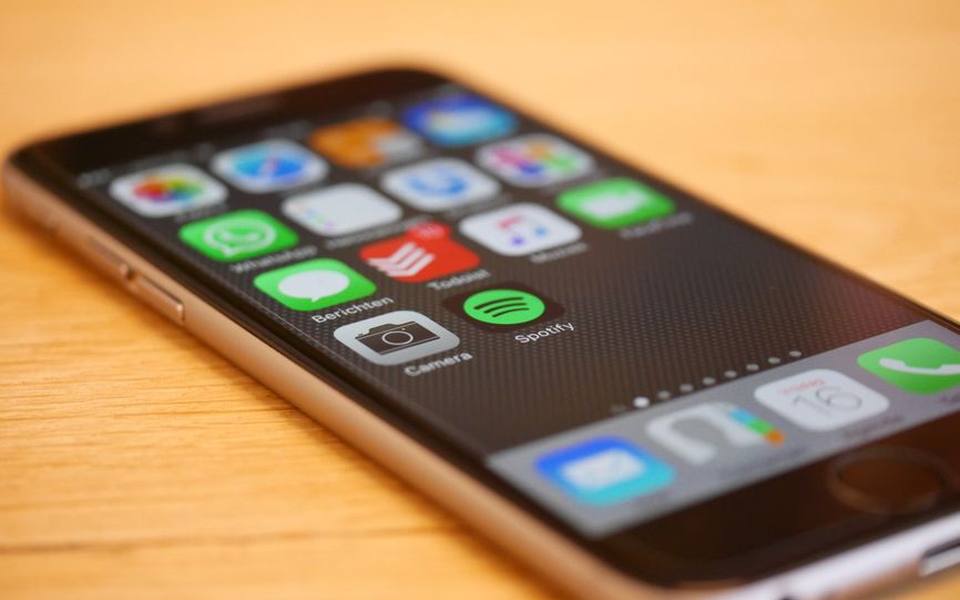
Shot planning becomes an intuitive habit when you consistently navigate digital layouts. In many mobile games, a player must account for a ten-mile-per-hour crosswind by altering aim points or selecting a lower-lofted club to keep trajectory under the gusts. While swiping a screen does not simulate the physical effort of hitting a knockdown four-iron, it ingrains the mental calculations necessary before stepping up to address a real ball in tough weather.
Pacing and patience represent another subtle benefit of mobile play. Many players struggle on the course because they rush between shots without evaluating the terrain or green firmness. Playing simulated rounds forces you to read slope grids and consider how roll-out changes between morning dew and baked afternoon fairways. When approached with an analytical mindset, screen-based golf sharpens tactical awareness that carries over into weekend matches.
How Mobile Launch Monitors Connect to Phones and Tablets
Hardware-driven mobile simulators function through either doppler radar or high-speed camera sensors that communicate directly with mobile operating systems. The unit sits behind the hitting area or beside the tee box, capturing data at impact before transmitting ball metrics to an app in fractions of a second. Modern devices typically utilize dedicated local Wi-Fi bands or low-energy Bluetooth connections to ensure the shot graphic appears on your screen before the physical ball has even finished landing in your net.
The primary appeal of mobile simulator apps is their portability and streamlined user interface. Instead of navigating complex desktop software with multiple windows, mobile apps consolidate carry distance, total yardage, launch angle, and apex height into clean, scrollable summaries. Many platforms also offer virtual range environments or rendered course holes where users can view 3D ball flight trajectories against simulated horizons, mirroring the experience of commercial studios right on an iPad or phone screen.
Operating systems handle these calculations differently depending on processor capabilities. Newer tablets and smartphones contain neural engines and multi-core graphics chips capable of rendering 3D physics engines without stuttering. Older devices may experience battery drain, thermal throttling, or noticeable lag between ball contact and screen response. Verifying app compatibility and device processing power before buying a mobile launch monitor saves headaches and guarantees smooth, responsive practice routines.
Critical Metrics to Watch on Mobile Simulator Screens
When working with mobile launch monitor apps, the volume of available numbers can easily overwhelm a recreational golfer. The most reliable numbers to prioritize during practice are carry distance and ball speed. Unlike total distance, which depends heavily on simulated ground firmness and roll settings, carry distance reveals pure energy transfer and strike efficiency. If your carry distance fluctuates wildly across five consecutive seven-iron swings, your strike location across the clubface needs immediate attention.
Launch angle and estimated backspin offer clear clues about your impact mechanics. Low-launching iron shots with excessive spin typically point to steep angles of attack or striking the ball high on the clubface, while high-launching drives with low spin indicate an optimal sweeping delivery. Mobile apps often color-code these metrics against typical target ranges, helping you understand whether a poor ball flight stemmed from swing speed deficiency or poor contact dynamics.
Offline dispersion—measured in yards or feet left and right of the target line—is where mobile simulators provide the best feedback for course preparation. Hitting fifty balls without a target line encourages lazy mechanics, but watching your shot grouping plot on an app screen forces honest accountability. Recognizing that your typical miss is twelve yards right rather than a dead slice changes how you aim off the tee when transitioning back to real turf.
Building a Safe Mobile Hitting Bay at Home
Creating an effective practice space with a mobile simulator requires careful planning around clearance and rebound safety. Overhead clearance is the primary physical constraint; most adult swings demand at least nine to ten feet of ceiling height to swing a driver freely without psychological hesitation. If a golfer subconsciously flattens their swing plane to avoid hitting a garage rail or basement joist, indoor practice does more harm than good to their mechanics.
Depth requirements depend on whether your mobile sensor uses radar or optical camera technology. Radar-based mobile units typically require six to eight feet of distance behind the ball to position the monitor, plus another eight to ten feet of open ball flight before striking the net so the radar can measure initial revolutions. Optical units sit right next to the hitting mat and require far less overall room length, making them ideal for compact spare bedrooms or narrow garage stalls.
The hitting surface and collection net should never be an afterthought. Thin hitting mats laid directly over concrete cause joint inflammation and wrist pain over repetitive sessions, while cheap nets can degrade under high ball speeds. Investing in a dense, multi-layer hitting strip protects your elbows and simulates genuine turf resistance, allowing your mobile simulator to register clean, repeatable impact data without physical strain.
Comparing Mobile Setups to Commercial Simulator Facilities
Portable mobile setups offer daily convenience, but they operate within specific technological boundaries compared to professional facilities. Dedicated venues found in directories for indoor bays or simulators rely on overhead multi-camera arrays and high-output photometric systems that measure clubhead path, face angle, and spin axis with laboratory precision. Mobile devices, while accurate enough for carry yardages, often rely on algorithms to estimate spin tilt and sidespin based on launch patterns.

The immersive experience at a commercial bay also changes how you play. Full-size projection screens spanning fifteen feet provide immediate visual feedback that a ten-inch tablet simply cannot replicate. Standing inside an enclosed simulator allows golfers to commit to full follow-throughs and visual tracking without the visual distraction of garage walls or backyard fences, creating a psychological environment much closer to an actual championship golf course.
That said, mobile simulators provide an unbeatable advantage in cost-per-swing and training frequency. Visiting a commercial simulator venue once a week yields good fun, but having a mobile monitor in your backyard lets you hit thirty balls every evening before dinner. Using commercial facilities for quarterly baseline tests and mobile devices for regular daily maintenance creates an effective, balanced improvement routine.
Taking Mobile Simulators to the Outdoor Range
Setting up a mobile launch monitor outdoors provides the best of both worlds: real ball flight you can watch with your own eyes paired with numerical data on your tablet screen. When you visit public driving ranges, clipping your phone to your bag or mounting a tablet on an alignment stick turns an ordinary practice bucket into an analytical diagnostic session. You can immediately confirm whether that high fade carried its expected distance or stalled out against a headwind.
Outdoor use introduces environmental challenges that indoor bays avoid. Bright sunlight can wash out mobile screens, making high-brightness displays or protective hoods necessary for visibility. Furthermore, tracking units that rely on camera optics must adjust to varying light conditions, while radar units can occasionally get confused by background range pickers, metal fencing, or adjacent golfers swinging simultaneously in neighboring stalls.
Many golfers combine their mobile devices with established facility infrastructure. If you practice at locations featuring ball-tracking or launch monitors, you can cross-reference your mobile unit's output against the range's integrated radar screens. This comparison helps you calibrate your personal device and understand how range balls—which typically fly shorter than premium urethane balls—alter your expected carry numbers.
Mobile Video Swing Analysis and Coaching Apps
Beyond shot simulation, mobile devices serve as powerful swing analysis suites thanks to modern high-frame-rate cameras. Capturing swings at 120 or 240 frames per second allows players to slow down the takeaway, transition, and impact intervals to diagnose mechanical faults that occur too fast for the naked eye. Built-in drawing tools let you trace swing planes, check head movement against reference lines, and inspect clubface orientation at the top of the backswing.
Self-diagnosis carries risks, however, especially if an amateur golfer misinterprets positions. Working with certified instructors at golf lessons ensures you use mobile video data constructively rather than chasing aesthetic positions that harm your natural rhythm. An instructor can highlight the one or two mechanical flaws that actually dictate your ball flight, preventing you from over-analyzing minor, harmless quirks in your swing.
Video apps also bridge the communication gap between lessons. Many teaching professionals encourage students to record swings during solo range sessions and submit short video clips through coaching apps for remote review. This ongoing feedback loop prevents bad habits from cementing between formal appointments, ensuring your mobile camera acts as an accountability partner rather than just an archive of swings.
Gamified Practice Modes to Combat Range Boredom
Mindlessly hitting ball after ball at the range often leads to diminishing returns and mental fatigue. Mobile simulator software combats this plateau by integrating structured target games, virtual long-drive competitions, and closest-to-the-pin challenges. Transforming a bucket of seventy balls into an objective contest with points and leaderboards simulates the psychological pressure of tournament golf, forcing you to execute with purpose on every stroke.

Virtual course play within mobile apps also teaches situational recovery. When you miss a simulated green on your tablet, the software assigns a specific pitch or chip distance based on your virtual lie. Practicing these randomized target distances into a net or across a range target field develops touch and distance control far better than hitting ten consecutive identical seven-iron shots to an open field.
Multiplayer challenges and online leagues have turned solitary practice into social events. Many mobile simulator platforms allow users across different states to compete in weekly nine-hole tournaments on world-famous virtual layouts. Competing against peers adds a healthy edge to winter garage sessions, keeping competitive instincts sharp when wet weather or cold temperatures close your local golf courses.
Hardware Management, Battery Life, and Device Safety
Running intensive 3D physics rendering alongside Bluetooth data transfer puts heavy demands on mobile hardware. Smartphones and tablets working in outdoor heat can throttle processor speeds to manage internal temperatures, leading to missed shots or frozen app interfaces. Positioning your device in shade, using light-colored cases, and avoiding direct midday sun keeps frame rates stable and hardware running smoothly throughout a full session.
Battery longevity is another crucial operational detail. Continuous camera tracking, active radar listening, and screen brightness set to maximum can deplete a modern phone battery in under two hours. Keeping a high-capacity external power bank in your golf bag ensures your tablet or tracking monitor maintains power through extended practice sessions, eliminating the frustration of having your tech shut down halfway through a bucket.
Physical safety for your mobile devices requires strict discipline on the tee line. A phone mounted on a flimsy tripod can easily get knocked over by wind gusts or struck by an errant ball ricocheting off a net frame. Always position screens safely behind the direct line of fire, use weighted tripod bases outdoors, and invest in heavy-duty protective cases that absorb drops on concrete range pads.
Bridging the Gap Between Screen Feedback and Real Turf
While mobile simulators and simulation games provide invaluable feedback, they cannot fully replicate the sensory nuances of hitting off real grass. Artificial mats tend to mask fat shots, allowing the clubhead to bounce into the ball and produce acceptable launch numbers that would result in a heavy chunk on natural turf. Periodic sessions on grass tee lines remain essential for calibrating your strike quality and turf interaction.
Reading wind, humidity, and green firmness also demands real-world exposure that no mobile screen can fully duplicate. Simulated golf gives you the mathematical baseline, but adjusting to a sidehill lie in wet rough requires tactile balance and instinct. Use mobile technology as an analytical laboratory to build your swing and refine numbers, but treat the physical golf course as the ultimate proving ground.
Integrating mobile tools into a balanced golf routine yields steady, measurable progress. By alternating between mental strategy games, home net practice with a mobile monitor, and open-air sessions at your local practice facility, you develop both technical precision and practical golf sense. Technology works best not as a substitute for real play, but as a clear window into how your swing truly performs.
Published 2026-09-21 · reviewed with each rebuild, last September 2026.
Find driving ranges near you
The directory lists 3,693 driving ranges by state and city — pick your state or use the “Near me” button in the header.
More guides
-
 Buying
Realistic Costs and Equipment Needed for a Home Golf Simulator
-
 Service
Golf Club Maintenance: Regripping and Reshafting Guide
-
 Money
MoneyGolf Lessons Cost and Beginner Guide: What to Expect and How to Budget
-
 Buying
Golf Club Fitting Cost and Selection Guide
-
 Buying
A Practical Guide to Buying, Selling, and Trading In Used Golf Clubs
-
 Money
MoneyDriving Range Costs, Practice Routines, and Range Etiquette
-
 Service
Fixing Topped Shots and Improving Ball Striking on the Range
-
 Buying
Best Golf Launch Monitors Buying Guide: Space, Tech, and Budget
-
 Buying
The Complete Guide to Buying Used Golf Clubs and Pre-Owned Equipment
-
 Buying
How to Choose the Best Local Golf Shop and Pro Shop Services
-
 Owning
Miniature Golf and Putt-Putt Guide: Rules, Courses, and Family Fun
-
 Service
Complete Guide to Custom Golf Fitting and Shaft Selection
-
 Buying
Complete Guide to Buying and Maintaining Golf Shoes and Cleats
-
 Owning
Designing and Installing Indoor and Backyard Putting Greens
-
 Service
Golf Swing Analytics, Speed Training, and Shot Tracking Systems
-
 Buying
Golf Practice Nets, Driving Mats, and Backyard Hitting Setups
-
 Buying
How to Buy Used Golf Clubs and Get the Best Demo Day Deals
-
 Owning
Custom Golf Gear Personalization: Stampers, Bags, and Embroidery
-
 Buying
Selecting and Setting Up Home Golf Simulators and Launch Monitors
-
 Service
Choosing Golf Academies, Lessons, and Coaching Programs
-
 Buying
Custom Golf Club Fitting: Shafts, Clubheads, and Specifications
-
 Service
Entertainment Driving Ranges: Planning Group Outings, Corporate Events, and Bachelor Parties
-
 Service
Mini Golf, Footgolf, and Indoor Golf: Complete Venue Guide and Directory
-
 Owning
Tournaments, Scoring Tech, and Gear Upkeep: The Modern Golfer's Guide
-
 Buying
Golf Equipment and Club Fitting Guide: Starter Sets, Drivers, and Custom Builds
-
 Buying
Finding the Right Golf Pro Shop and Equipment Retailer
-
 Owning
Designing and Hosting Mini Golf Events: Indoor Party Venues and Practice Games
-
 Buying
Indoor Golf Practice and Launch Monitors: How to Build Your Studio
-
 Buying
Golf Laser Rangefinders Buyer's Guide: Features, Accuracy, and Value
-
 Owning
Golf Club Groove Maintenance: Tools, Techniques, and Equipment Care
-
 Buying
Commercial Golf Green Mowers: Maintenance, Selection, and Buying Guide
-
 Owning
Fixing Heavy Contact, Managing Distance, and Choosing Cold-Weather Gear
-
 Buying
Club Car Golf Carts: The Practical Guide to Buying, Inspecting, and Customizing
-
 Owning
Complete Guide to Putt-Putt Games: History, Titles, Platforms, and Walkthroughs
-
 Service
Top Sports Bars and Lounges: How to Pick the Best Game-Day Spots in NYC and Florida
-
 Safety
24-Hour Gun and Shooting Ranges: Availability, Rules, and Finding Round-the-Clock Facilities
-
 Owning
Golf Green Mobile Estates: Guide to Golf Community Living and Amenities